Manage the team
- Accounts set up
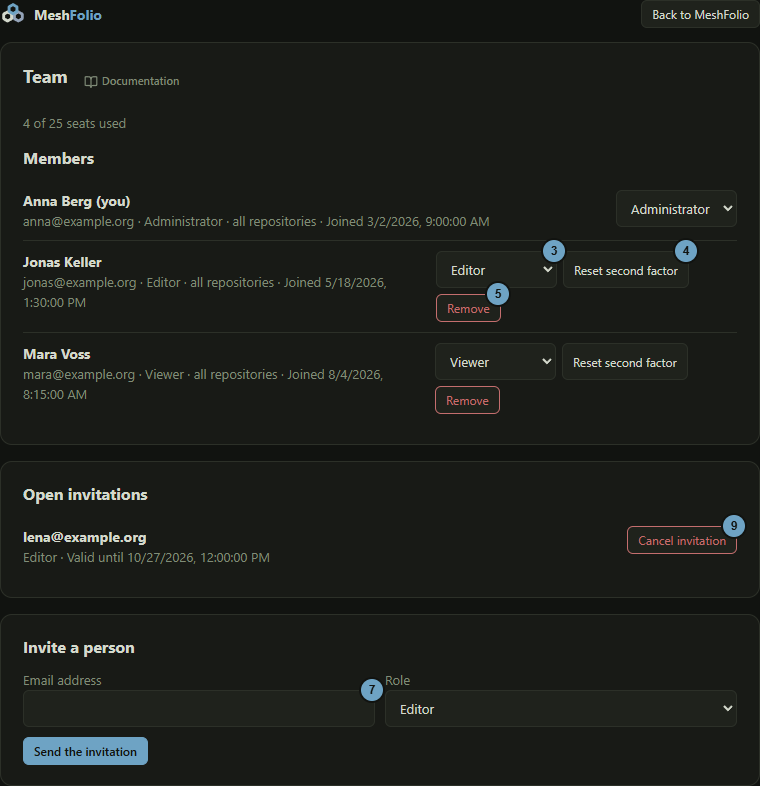
The team page shows who belongs to your team and manages it: you change roles, invite people, reset the second factor of a person and remove members. The page opens outside the editor and leads back there with Back to MeshFolio.
Members, roles and invitations
How it works
- Click the user icon at the top, then Team in the menu.
- Read at the top how many seats are used, and below it the members with role and date of joining. Behind your own name it says “(you)”.
- Choose another role for a member: Administrator, Editor or Viewer.
- For a member who has lost access to the second factor, click Reset second factor and confirm the question.
- Click Remove to take a member out of the team and confirm the question.
- Under Open invitations, read who is invited and until when the link is valid.
- Under Invite a person, enter the Email address and choose the Role.
- Click Send the invitation.
- For an open invitation that should no longer count, click Cancel invitation.
Effects
| Input or choice | Affects | Result |
|---|---|---|
| Role of a member | Member | Sets the role for all repositories of the team. The change applies at once. A team needs at least one administrator, the message says so. |
| Reset second factor | Member | Signs the person out and sends an email with a link to set up the second factor again. The message “The second factor was reset and a mail was sent.” confirms it. Your own row has no such button. For a person who signs in through a service such as GitHub, the reset is refused, because the service carries the second factor. |
| Remove | Member | Takes the person out of the team. Their sessions end at once. Your own row has no such button. |
| Send the invitation | Invitations | Sends an email with a link. “The invitation was sent.” confirms it, and the field empties. If the address already has an account, no email goes out and the page still reports success. A new invitation to the same address replaces the older one. The invitation takes a seat until it is accepted, expires or you cancel it. |
| Cancel invitation | Invitation | The link of the invitation stops working, the seat is free again. |
| Back to MeshFolio | Page | Leads back to the editor. |